
One app. Its own route.
Use the VPN for apps you launch from Muddog and their child processes. Your other apps keep using your regular connection.
Say hello to Muddog 2
Choose a country. Find a new way to connect with Muddog, the free P2P VPN that brings people’s internet connections together.
Participants also share their own internet connection.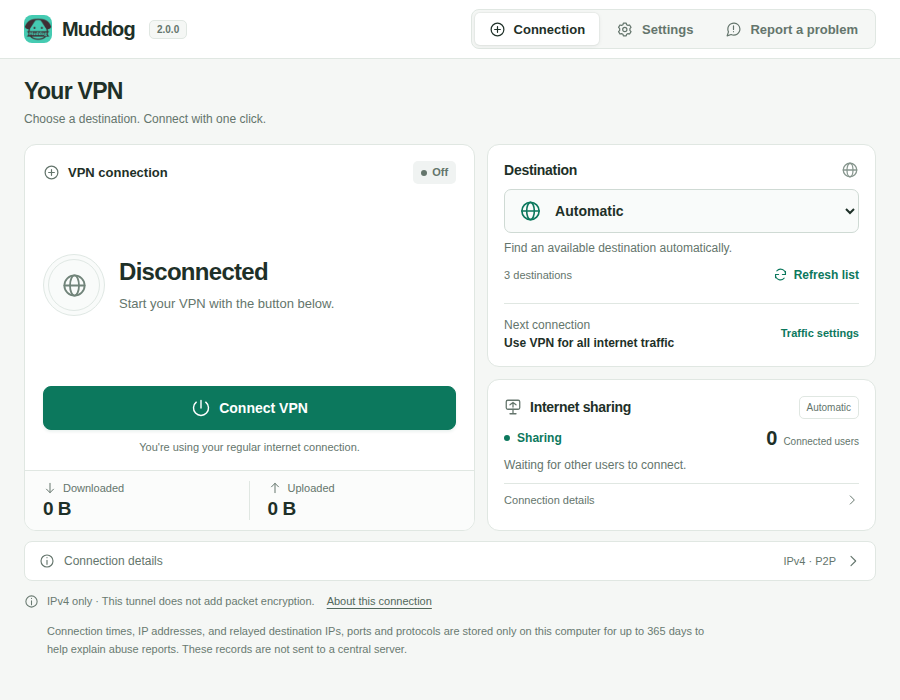
Skip creating an accountGet started
Choose where to connectFind a new route
Choose which apps use itMake it your own
More control. Less effort.
Want just one browser to connect through another country? With Muddog 2, you decide where your VPN is used.
Use the VPN for apps you launch from Muddog and their child processes. Your other apps keep using your regular connection.
Pick a country or let automatic selection find one. Muddog looks for an available peer there. Available countries and connection quality depend on the participants online.
Route all IPv4 internet traffic, or include or exclude specific IP addresses and ranges. Saved changes apply the next time you connect.
These features apply to Muddog 2 for Linux. Per-app VPN requires launching the app from Muddog. Snap and Flatpak apps are not supported.
An easy start
Install the package for your operating system and open the Muddog app.
See installation detailsPick a country on the connection screen. If you do not need a specific country, start with automatic selection.
Press Connect and wait for the Connected status. In per-app mode, launch the apps you want to use from Muddog.
Your next connection / MUDDOG
Download the Muddog 2 installer for your operating system.
Meet the new connection screen, per-app VPN and routing by IP address or range.
Debian / Ubuntu · DEB
sudo apt install ./muddog_2.0.0_amd64.deb
Fedora · RPM
sudo dnf install ./muddog-2.0.0-1.x86_64.rpm
Log out and back in after installing, then open Muddog from your applications menu. Internet sharing starts during installation.
Per-app VPN requires a systemd user session, cgroup v2 and nftables. Snap and Flatpak apps are not supported.
The Muddog 2 installer for Windows.
Download for WindowsA Universal package for Apple Silicon and Intel Macs.
Download for macOSMuddog is a P2P VPN that also shares your connection. Check how sharing and routing work before installing. Learn more ↗
VPN connections and internet sharing are free, with no login required. As a participant, you also share your internet connection with other users.
Use an internet connection in another country, or give a specific app a different route. Access to restricted services and connection speed depend on the peer’s connection and the service’s policies.
The Muddog P2P tunnel does not add packet encryption. Website HTTPS encryption remains intact. Only IPv4 is tunneled; IPv6 uses your regular connection. There is no kill switch to block internet traffic if the VPN disconnects.
Your VPN and internet sharing continue when you close the window. Reopen the app and press Disconnect to stop your own VPN. To stop the Linux sharing service, stop the service or uninstall the package.
To help you explain potential misuse of your connection, metadata such as connection times, IP addresses and relay destinations is stored only on your computer for up to 365 days. These records are not sent to a central server, and packet contents are not recorded. You can review the records in the app’s settings.
Yes. Muddog 2 provides installers for Linux, Windows, and macOS. Download the x64 MSI for Windows or the Universal DMG for macOS, which supports Apple Silicon and Intel Macs.